

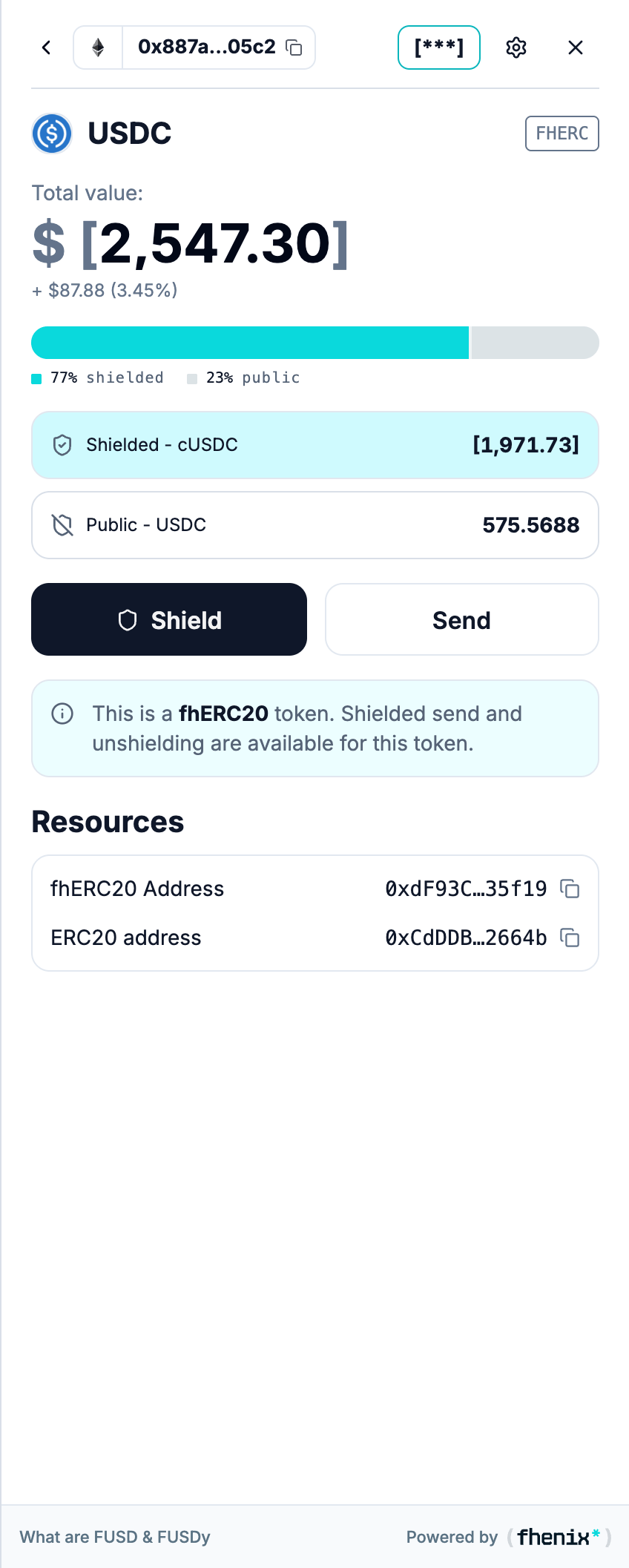
See the confidential token and its underlying public asset together. To open it, select a token with the FHERC badge in your portfolio.
Screen components
- Token heading and FHERC badge. Identify the confidential wrapped token.
- Total value and balance bar. Review the combined display and its private/public split.
- Shielded row. Shows the confidential token balance.
- Public row. Shows the corresponding public asset balance. Check the ticker, because the public and confidential tokens can use different names.
- Shield and Send. Start a conversion or transfer for this asset.
- Token information. Explains which confidential actions are supported.
- Resources. The FHERC20 and ERC20 addresses identify different contracts. Use the copy control for the one you need.
Steps
1
Check both tokens
Confirm both token names and their balances.
2
Shield a public asset
Use Shield to move public assets into confidential form.
3
Unshield and claim
Use Unshield and complete Claim when you need the public asset again.
A wrapped token uses a confidential counterpart to a public asset. A DUAL token holds both modes within one token contract.