

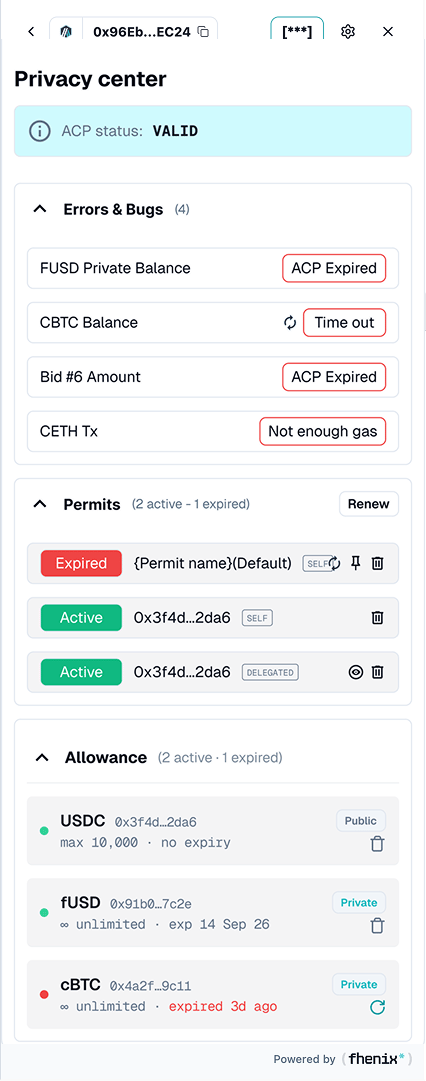
Check viewing permissions, token allowances, and errors in one place. To open it, use the wallet privacy controls or an error banner.
Screen components
- ACP status. Shows the reported access-permit status. Check the individual error rows as well as the summary.
- Errors and Bugs. Each row names the affected balance or action and its error, such as ACP Expired, Time out, or Not enough gas.
- Retry controls. A retry icon appears for retryable failures such as a timed-out balance request.
- Permits. Review active and expired permits. Use Renew when your viewing authorization needs renewal.
- Allowance. Review token-use permissions separately from viewing permits. Rows show an asset, address, public/private label, limit, and any expiration.
- Allowance actions. Use the available action to review removal or renewal. Read its confirmation and any connected-wallet request.
Steps
1
Find the affected item
Find the affected token or action in the error list.
2
Apply the fix
Renew a missing or expired viewing permit, retry a timed-out query, or add gas for a gas error.
3
Recheck
Return to the wallet and check the affected balance or action again.
Permits control access to encrypted information. Allowances authorize token use by an address or contract. Renewing one does not necessarily repair the other.