

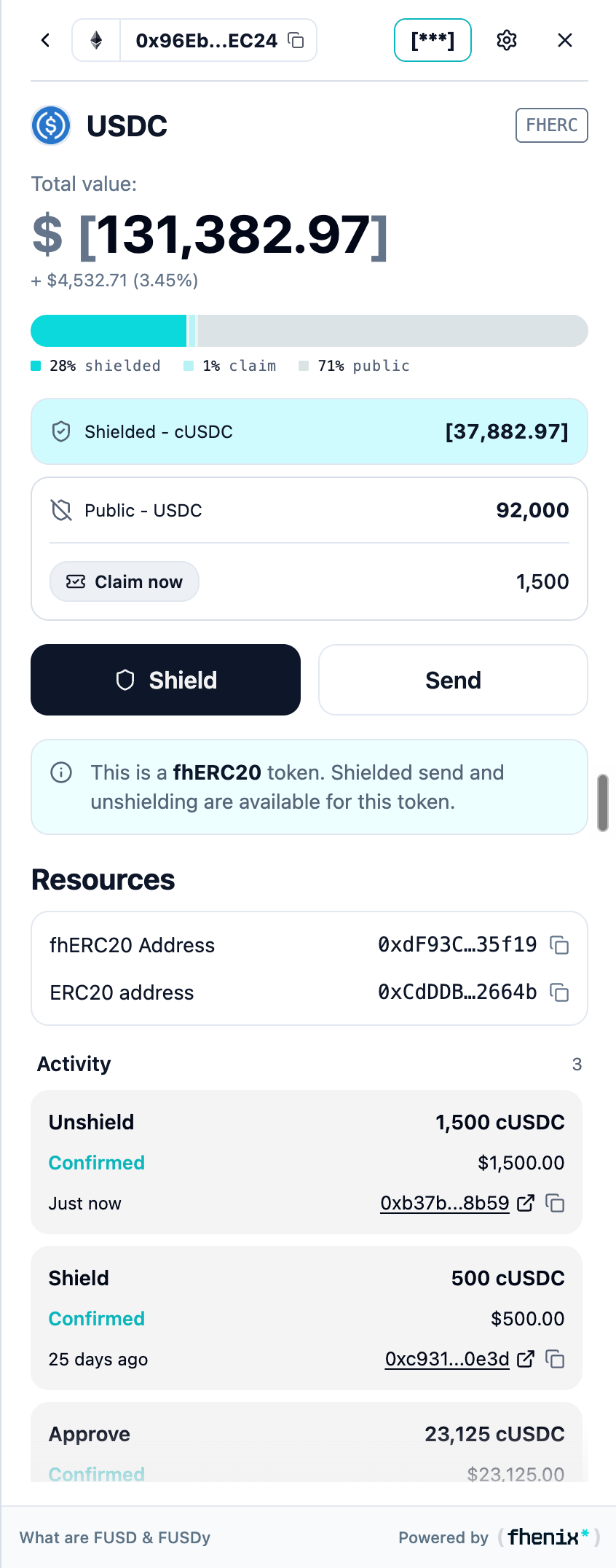
Complete an unshielding request once its tokens are ready to claim. To open it, open the token details and look for Claim now and the claimable amount.
Screen components
- Balance split. Review the private, public, and pending portions of the token.
- Shielded and public rows. Distinguish the confidential balance from the public balance.
- Claimable amount. Shows the amount awaiting the final claim action.
- Claim now. Starts the final step for the available amount.
- Other actions. Shield and Send remain separate actions. Starting another action does not replace Claim.
Steps
1
Wait until the request is ready
Claim now appears when the amount is available.
2
Check the claim
Confirm the claimable asset and amount.
3
Claim
Select Claim now and complete any wallet confirmation.
4
Verify
Wait for completion, then check the public balance and activity.
The dual-token detail screen also has a Claim now action. A pending amount is not a completed claim.