

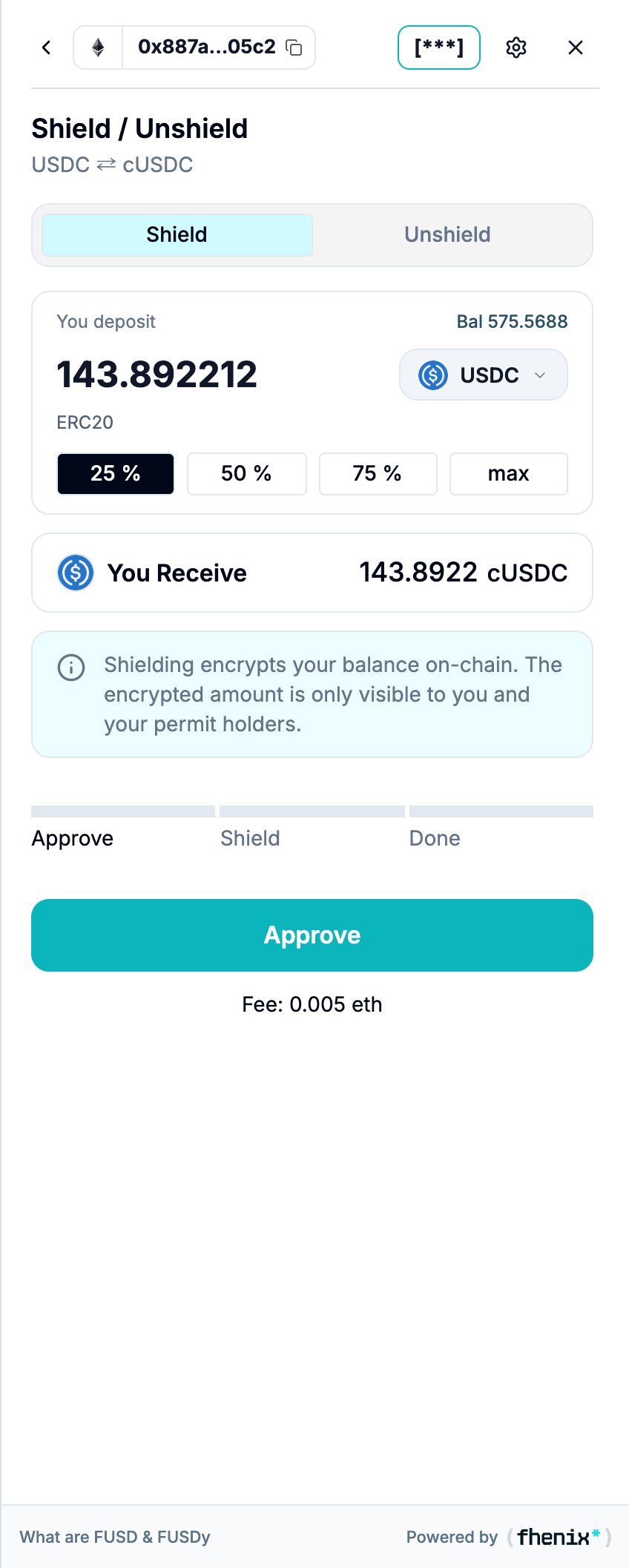
Move an amount from a public balance into confidential form. To open it, choose Shield from the portfolio or token details.
Screen components
- Shield and Unshield tabs. Select Shield for public-to-private conversion.
- You deposit. Enter the amount and choose the token. The balance label helps you check available funds.
- Amount shortcuts. 25%, 50%, 75%, and max fill the amount using the available balance.
- You Receive. Review the confidential asset and amount you receive.
- Privacy notice. Explains that the resulting balance is encrypted and viewable with the appropriate permission.
- Progress tracker. Follow the required steps. The wrapped-token flow shown here has Approve, Shield, and Done.
- Shield button and fee. Start or continue the flow. Review the wallet request and the current fee estimate.
Steps
1
Enter the shield details
Select Shield, a token, and an amount.
2
Review the result and fee
Check You Receive and the fee.
3
Approve if requested
If the wallet requests an approval, confirm the token approval in your connected wallet.
4
Shield and wait
Continue with Shield and wait for completion.
Approval authorizes token use. It does not shield tokens. Follow every required step.