

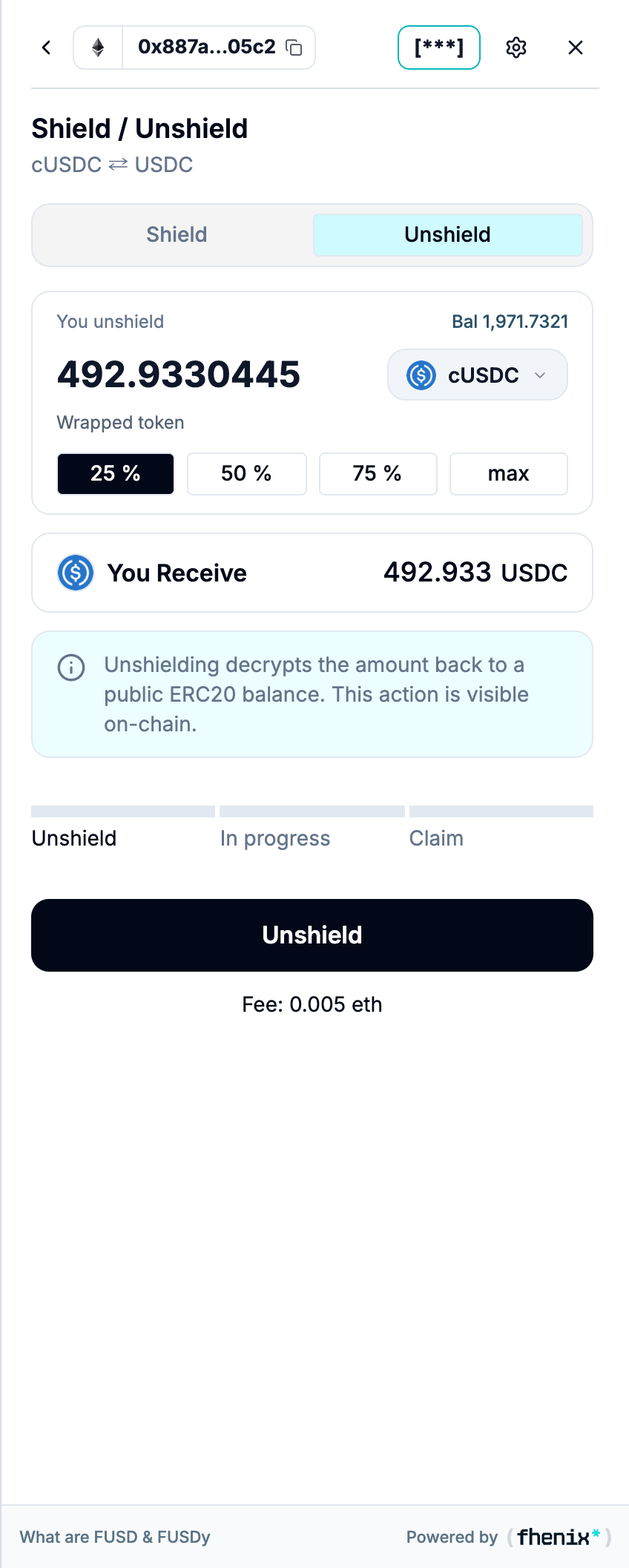
Move a private amount back into public form. Unshielding has three stages: Unshield, In progress, and Claim. To open it, open Shield / Unshield and select Unshield.
Screen components
- Unshield tab. Check that Unshield is selected before you enter an amount.
- You unshield. Choose the confidential asset and enter an amount within its available private balance.
- Amount shortcuts. Use 25%, 50%, 75%, or max to fill the amount.
- You Receive. Check the public asset and amount shown by the live application.
- Privacy notice. Unshielding exposes the selected amount as a public balance. This action is visible onchain.
- Three-stage tracker. Unshield starts the request. In progress means processing is underway. Claim is the final action.
- Unshield button and fee. Submit the request through your connected wallet after you review its details.
Steps
1
Enter the unshield details
Select the token and amount, and review the public output.
2
Confirm in your wallet
Confirm Unshield in your connected wallet.
3
Wait through In progress
Processing continues until the amount is ready.
4
Claim
When Claim is available, complete it to receive the public balance.