

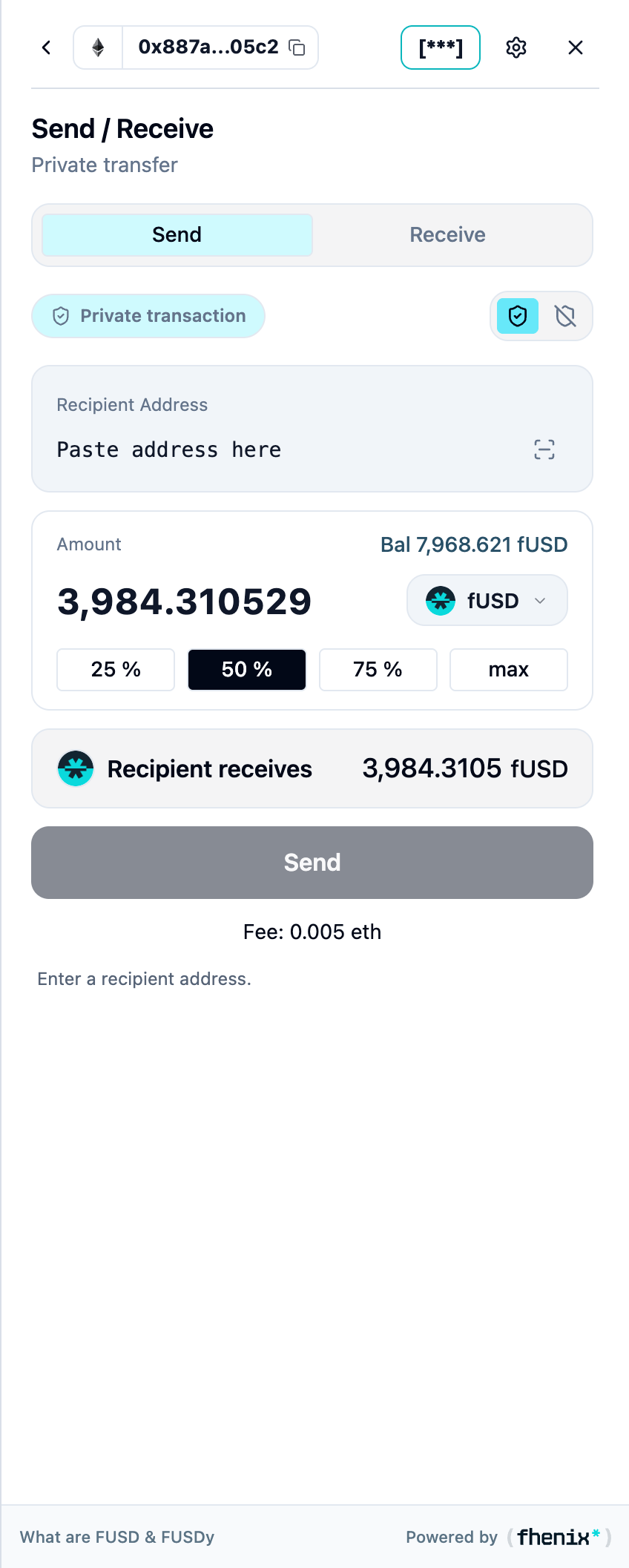
Transfer a supported token using either its private or public balance. To open it, choose Send from the portfolio or token details.
Screen components
- Send and Receive tabs. Keep Send selected to make a transfer.
- Privacy mode. The shield controls and the Private transaction label show the selected transfer mode. Check it before you continue.
- Recipient address. Paste the destination wallet address and verify it.
- Amount and token. Choose the asset and amount. The balance shown corresponds to the selected mode.
- Amount shortcuts. Use a percentage or max to fill the amount, then recheck it.
- Recipient receives. Review the destination asset and amount.
- Send and fee. Continue to your connected wallet and review its transaction request.
Steps
1
Choose the mode
Choose private or public transfer mode.
2
Enter the transfer details
Enter the recipient, token, and amount.
3
Review
Check Recipient receives and the fee.
4
Send
Select Send, confirm in your wallet, and monitor completion in Activity.
Private transfers protect the amount. They do not make wallet addresses anonymous. Public transfers expose their amounts onchain.